> ## Documentation Index
> Fetch the complete documentation index at: https://docs.sculkhosting.com/llms.txt
> Use this file to discover all available pages before exploring further.
# Automate tasks with schedules
> Set recurring backups, restarts, or commands.
Open **Schedules** and select **New schedule**. The panel uses cron timing for recurring tasks. Create a schedule, add its tasks, then review the timing and order before enabling it.
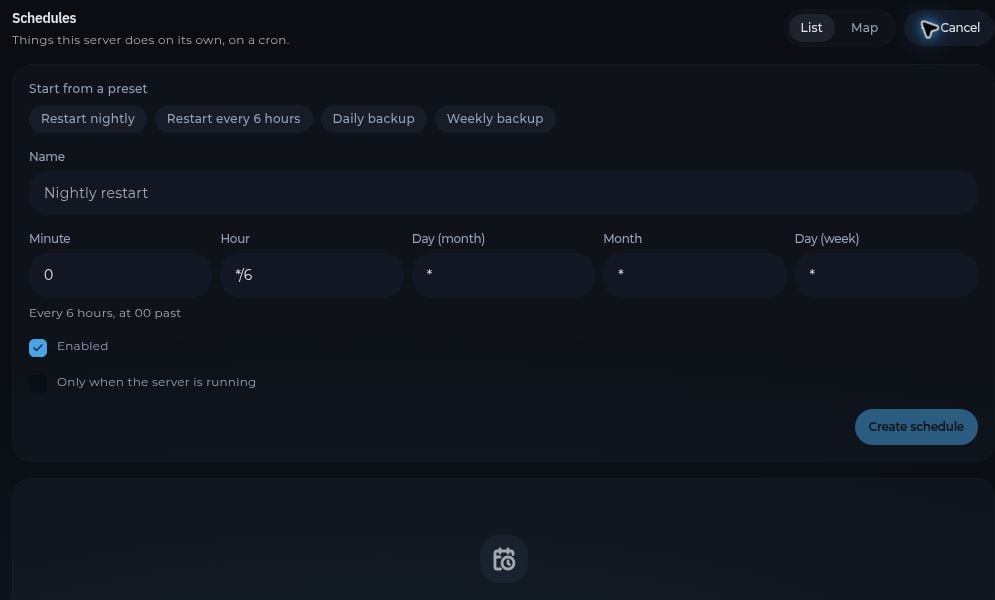 Common tasks include a backup, a server restart, and a console command. For a routine restart, consider backing up first and allowing enough time for the backup to finish. Check the schedule after its first run to confirm that it worked as expected.
The **List** and **Map** tabs show the same schedules in different views. If a task does not run, check the schedule's settings and the server's **Activity** and **Console** pages.
This documentation is built and hosted on [Mintlify](https://mintlify.com), a developer documentation platform.
Common tasks include a backup, a server restart, and a console command. For a routine restart, consider backing up first and allowing enough time for the backup to finish. Check the schedule after its first run to confirm that it worked as expected.
The **List** and **Map** tabs show the same schedules in different views. If a task does not run, check the schedule's settings and the server's **Activity** and **Console** pages.
This documentation is built and hosted on [Mintlify](https://mintlify.com), a developer documentation platform.