> ## Documentation Index
> Fetch the complete documentation index at: https://docs.sculkhosting.com/llms.txt
> Use this file to discover all available pages before exploring further.
# Import from another host
> Transfer server files over SFTP or FTP.
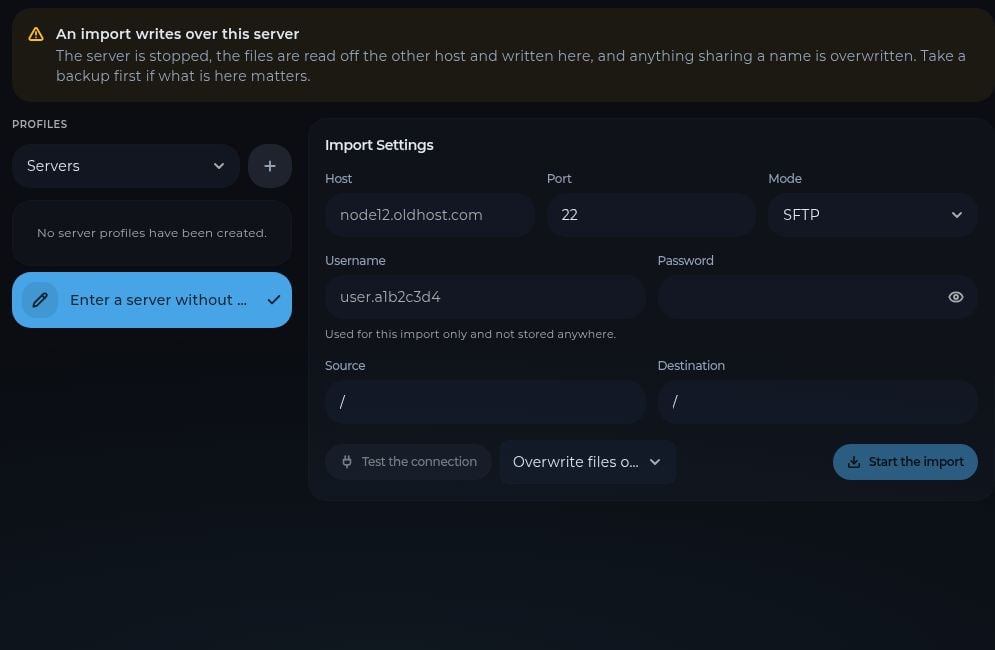
Open **Import** on the destination server. The import tool reads files from your previous host and writes them to this server. It stops the destination server and can overwrite files with the same names.
 Make a [backup](/server-management/backups) of any files already on the Sculk server that you need to keep.
Enter the old host, port, transfer mode, username, and password. You can enter a server for one import without saving a profile. The panel says the password for this import is not stored.
Set **Source** to the folder on the old host and **Destination** to the folder here. The default `/` means the root of each server's files.
Select **Test the connection**. Review the overwrite option, then select **Start the import**. Wait for the transfer to finish before starting the server.
After the import, check **Startup**, **Version**, and **Console**. The old host's game files may require a different Java version, server software, or startup setting. If the previous host does not provide SFTP or FTP access, use [Files and SFTP](/server-management/files-sftp) to upload an archive or files manually.
This documentation is built and hosted on [Mintlify](https://mintlify.com), a developer documentation platform.
Make a [backup](/server-management/backups) of any files already on the Sculk server that you need to keep.
Enter the old host, port, transfer mode, username, and password. You can enter a server for one import without saving a profile. The panel says the password for this import is not stored.
Set **Source** to the folder on the old host and **Destination** to the folder here. The default `/` means the root of each server's files.
Select **Test the connection**. Review the overwrite option, then select **Start the import**. Wait for the transfer to finish before starting the server.
After the import, check **Startup**, **Version**, and **Console**. The old host's game files may require a different Java version, server software, or startup setting. If the previous host does not provide SFTP or FTP access, use [Files and SFTP](/server-management/files-sftp) to upload an archive or files manually.
This documentation is built and hosted on [Mintlify](https://mintlify.com), a developer documentation platform.